Overview
The Analog Source outputs a configurable Redstone signal at its output pins. The signal value and output configuration can be adjusted through both direct interaction and the GUI Menu, which opens by right-clicking the block.
The output signal can be increased by right-clicking the knob and decreased by crouching and right-clicking the knob.
Right-clicking any other part of the block opens the GUI Menu, while crouching and right-clicking any other part changes the output pin layout.
The output signal setting and its range can be copied by right-clicking Analog Source block with Analog Source item.
Crafting
| Ingredients | RedCu Crafter Recipe |
| 1 Smooth Stone Plate | |
| 1 Redstone Dust | |
| 1 Quartz |
GUI
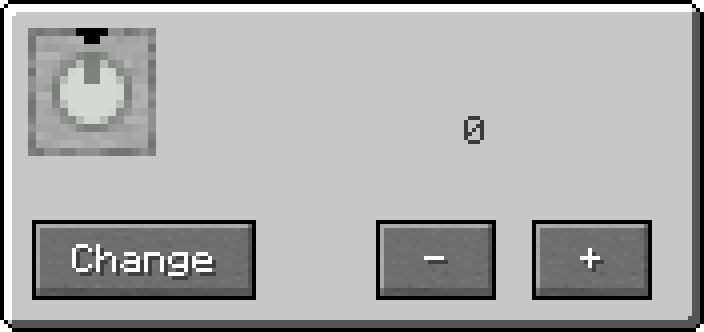
In the GUI Menu:
- Press "+" or "-" to change the Redstone signal strength.
- Pressing "+" while signal is at 15 will set the signal to 0.
- Pressing "-" while signal is at 0 will set the signal to 15.
- Clicking on the numbers around the dial will set the signal to the clicked number.
- Use the upper box to set a maximum signal limit.
- Use the lower box to set a minimum signal limit.
- Changing the signal will rotate the dial.
- Use the buttons at bottom-right corner to change output directions.
The output pins are marked with Pin Mark A.
Adventure Mode
While in adventure mode, /redstonecg_adventure controls:
/redstonecg_adventure gateGUI false- Disables GUI./redstonecg_adventure valueConfig false- Removes "+" and "-" buttons, removes upper and lower signal range edit boxes and locks the dial./redstonecg_adventure pinConfig false- Removes Pin Mark configuration buttons.
Text
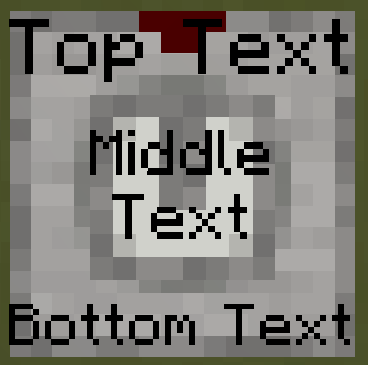
A text can be written on the block with Formatting Notation by changing the item name with an Anvil.
The text will always appear on the bases top surface above the knob unless the text is formatted as multiline with \p.
In that case, first and last lines will always be above and below the knob and the rest will be on the knobs top surface.
Text will be scaled to fit said regions.
Data
Block State
Registry name: redstonecg:normal_analog_source
Block properties:
facing(down|north|east|south|west|up): sets the direction the block's bottom face is facing.rotation(north|east|south|west): rotates the block around its local Y-axis (0°, 90°, 180°, 270°).waterlogged(false|true): determines whether the block is waterlogged.connection(0|1|2|3|4|5|6|7|8|9|10|11|12|13|14): sets Pin Mark configuration.
Block Entity
Structure:
-
id: block entity identifier -redstonecg:analog_source -
x: X coordinate of the block entity. -
y: Y coordinate of the block entity. -
z: Z coordinate of the block entity. -
power: output signal strength of the block (0-15). -
power_min: minimum output signal that can be set. -
power_max: maximum output signal that can be set. -
CustomName(Optional): custom name of the block and displayed text.
Item
Structure (1.20.4 and older):
-
id: item identifier -redstonecg:normal_analog_source -
Count: the amount of items in this stack. -
tag(Optional): additional item data.-
display(Optional): item display data.-
Name: Composed text used for the item name and as displayed text.
-
-
BlockParameterSet(Optional): set of parameters for placing a block.-
connection(Optional): target Pin Mark configuration of the block. -
power(Optional): target output signal of the block. Also used by Control Panel Panel to store the set signal. -
range(Optional) (length of 2): array containing the target minimum and maximum settable output signal. Also used by Control Panel Panel.
-
-
Structure (1.20.6 and newer):
-
id: item identifier -redstonecg:normal_analog_source -
Count: the amount of items in this stack. -
components(Optional): item data components.-
minecraft:custom_name(Optional): Composed text used for the item name and as displayed text. -
minecraft:custom_data(Optional): custom item data.-
BlockParameterSet(Optional): set of parameters for placing a block.-
connection(Optional): target Pin Mark configuration of the block. -
power(Optional): target output signal of the block. Also used by Control Panel Panel to store the set signal. -
range(Optional) (length of 2): array containing the target minimum and maximum settable output signal. Also used by Control Panel Panel.
-
-
-
Version Log
| Version | Description |
| 0.0.0 | Introduced. Updates neighbours when output changes. Uses NBT to store output data. |
| 0.1.0 | Increased the amount of pin configurations up to 15. |
| 0.1.1 | Changed registry name from analog_source to floor_analog_source. Replaced bottom texture from being that on the top to Smooth Stone Block. |
| 0.2.0 | Changed registry name from floor_analog_source to normal_analog_source. Can be placed on walls and ceiling. Updates the block on the output when output changes instead of updating all neighbours. Output data is stored directly on Block Entity. Lost `rotate` and `mirror` block methods.. |
| 0.2.1 | Redesigned GUI. Reimplemented `rotate` block method. /redstonecg_adventure affects GUI. |
| 0.3.1 | Added physical knob and removed output signal configuration by right-clicking Analog Source with Analog Source item. |
| 0.3.2 | Output signal configuration can be limited in the GUI and the configuration can be copied with Analog Source item. |
| 0.3.3 | A text can be written on the block and replaced "Change" button with dedicated pin configuration buttons. |