Overview
The Red Button works similarly to a Minecraft Button. It can be activated by right-clicking, and will remain in the on state for up to 10 game ticks (approximately half a second) before automatically resetting.
The Red Button can also be forcefully reset to an off state by right-clicking again while it is active.
Right-clicking any other part will change the output pin configuration, where Pin Mark A shows the location of outputs.
Crafting
| Ingredients | RedCu Crafter Recipe |
| 1 Smooth Stone Plate | |
| 1 Redstone Dust | |
| 1 Stick |
Adventure Mode
While in adventure mode, /redstonecg_adventure controls:
/redstonecg_adventure valueConfig false- Locks the button./redstonecg_adventure pinConfig false- Disables Pin Mark configuration.
Text
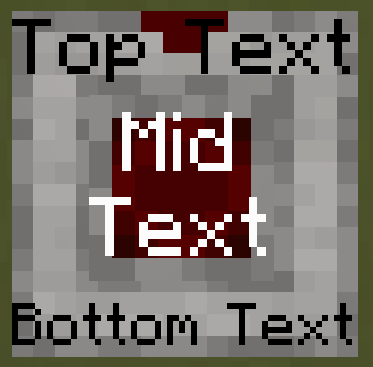
A text can be written on the block with Formatting Notation by changing the item name with an Anvil.
The text will always appear on the bases top surface above the button unless the text is formatted as multiline with \p.
In that case, first and last lines will always be above and below the button and the rest will be on the buttons top surface.
Text will be scaled to fit said regions.
Data
Block State
Registry name: redstonecg:red_button
Block properties:
facing(down|north|east|south|west|up): sets the direction the block's bottom face is facing.rotation(north|east|south|west): rotates the block around its local Y-axis (0°, 90°, 180°, 270°).waterlogged(false|true): determines whether the block is waterlogged.connection(0|1|2|3|4|5|6|7|8|9|10|11|12|13|14): sets Pin Mark configuration.state(false|true): determines whether the block is off or on.
Block Entity
Structure:
-
id: block entity identifier -redstonecg:red_toggle -
x: X coordinate of the block entity. -
y: Y coordinate of the block entity. -
z: Z coordinate of the block entity. -
CustomName(Optional): custom name of the block and displayed text.
Item
Structure (1.20.4 and older):
-
id: item identifier -redstonecg:red_button -
Count: the amount of items in this stack. -
tag(Optional): additional item data.-
display(Optional): item display data.-
Name: Composed text used for the item name and as displayed text.
-
-
BlockParameterSet(Optional): set of parameters for placing a block.-
output: used by Control Panel Panel to store the output signal state.
-
-
Structure (1.20.6 and newer):
-
id: item identifier -redstonecg:red_button -
Count: the amount of items in this stack. -
components(Optional): item data components.-
minecraft:custom_name(Optional): Composed text used for the item name and as displayed text. -
minecraft:custom_data(Optional): custom item data.-
BlockParameterSet(Optional): set of parameters for placing a block.-
output: used by Control Panel Panel to store the output signal state.
-
-
-
Version Log
| Version | Description |
| 0.3.2 | Introduced. |
| 0.3.3 | A text can be written on the block. |