Overview
The Block Reader functions similarly to the Minecraft Redstone Comparator, with one key difference: it cannot perform comparison on its own. To compare signals, connect it to a Comparator.
Aside from lacking comparison mode, the Block Reader is a direct functional copy of the vanilla Comparator. It reads data from blocks such as Chests, Lecterns, Item Frames, and any block placed behind a Comparator-Conducting Block. Its output signal strength depends on the block being read.
Container Logic
If the block is a container, the output signal O depends on the number of stored items:
- Q - Number of items currently inside the container
- V - Maximum number of items the container can store
Item Frame Logic
- Empty Item Frame = 0
- Item Frame with item = 1 to 8 depending on item rotation
For all other cases, refer to Minecraft's Comparator logic on the official wiki.
Semi-Quasi Connectivity
The Block Reader has a special behavior when reading blocks behind a Comparator-Conducting Block. This behavior resembles quasi-connectivity but is not identical.
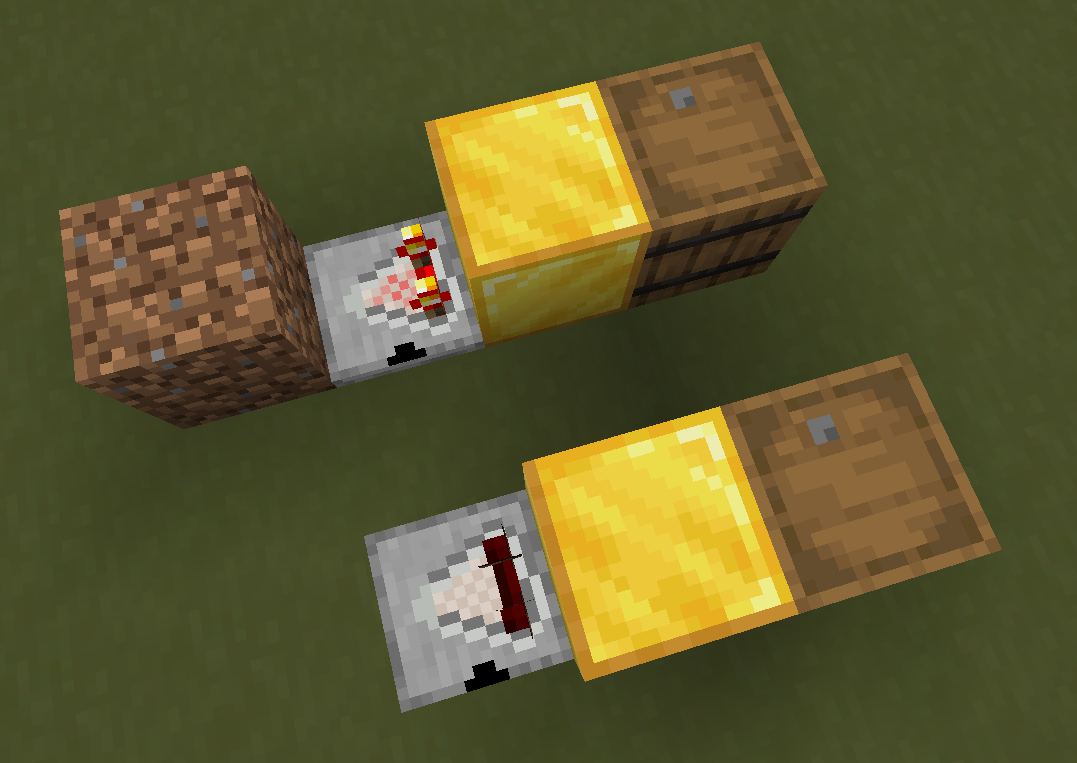
- A Block Reader is placed facing a Comparator-Conducting Block.
- A readable block (such as an Item Frame) is placed in line behind that block.
You might expect it to behave like the vanilla Redstone Comparator and update immediately after step 2, but the Block Reader does not activate instantly. Initially, the Block Reader is asleep - it doesn't detect a valid block to read yet.
The Block Reader must receive a neighbor update to perform a data check. Once triggered, it detects the readable block behind the Comparator-Conducting Block and begins updating automatically every 2 ticks. This continues as long as the readable block remains in place.
This mechanic is intentional. Implementing full Redstone Comparator behavior accurately is non-trivial, and this update cycle prevents unnecessary performance cost. For best performance, avoid using intermediate Comparator-Conducting Block when possible.
Configuration
Pin Mark A shows where the Block Reader will output a Redstone Signal. Right-click to change.
Right-click Block Reader with Block Reader item to toggle block to read block data in the direction of Block Reader base .
Crafting
| Ingredients | RedCu Crafter Recipe |
| 1 Redstone Comparator |
Data
Block State
Block Reader registry name: redstonecg:normal_block_reader
Block properties:
facing(down|north|east|south|west|up): sets the direction block's bottom face is facing.rotation(north|east|south|west): rotates block around its local Y-axis (0°, 90°, 180°, 270°).visible_state(false|true): determines if the mark is lit or not.waterlogged(false|true): determines whether the block is waterlogged.connection(0|1|2|3|4|5|6): sets Pin Mark configuration.base_read(false|true): iftrue, Block Reader reads the block in the direction of its base. Iffalse, it reads the block in front of it.
Block Entity
Structure (all versions):
-
id: block entity identifier -redstonecg:default_analog_gate -
x: X coordinate of the block entity. -
y: Y coordinate of the block entity. -
z: Z coordinate of the block entity. -
power: the output signal strength of the Block Reader (0-15).
Version Log
| Version | Description |
| 0.2.3 | Introduced. |
| 0.3.0 | Added ability to toggle between reading block data in forward direction and block base direction by right-clicking Block Reader with Block Reader item. |