Overview
Colored Lamp is an indicator block that increases its brightness based on the incoming Redstone signal strength.
The lamp can be recolored using Stained Glass Panes, allowing players to customize the appearance of indicators for decorative builds or complex circuits.
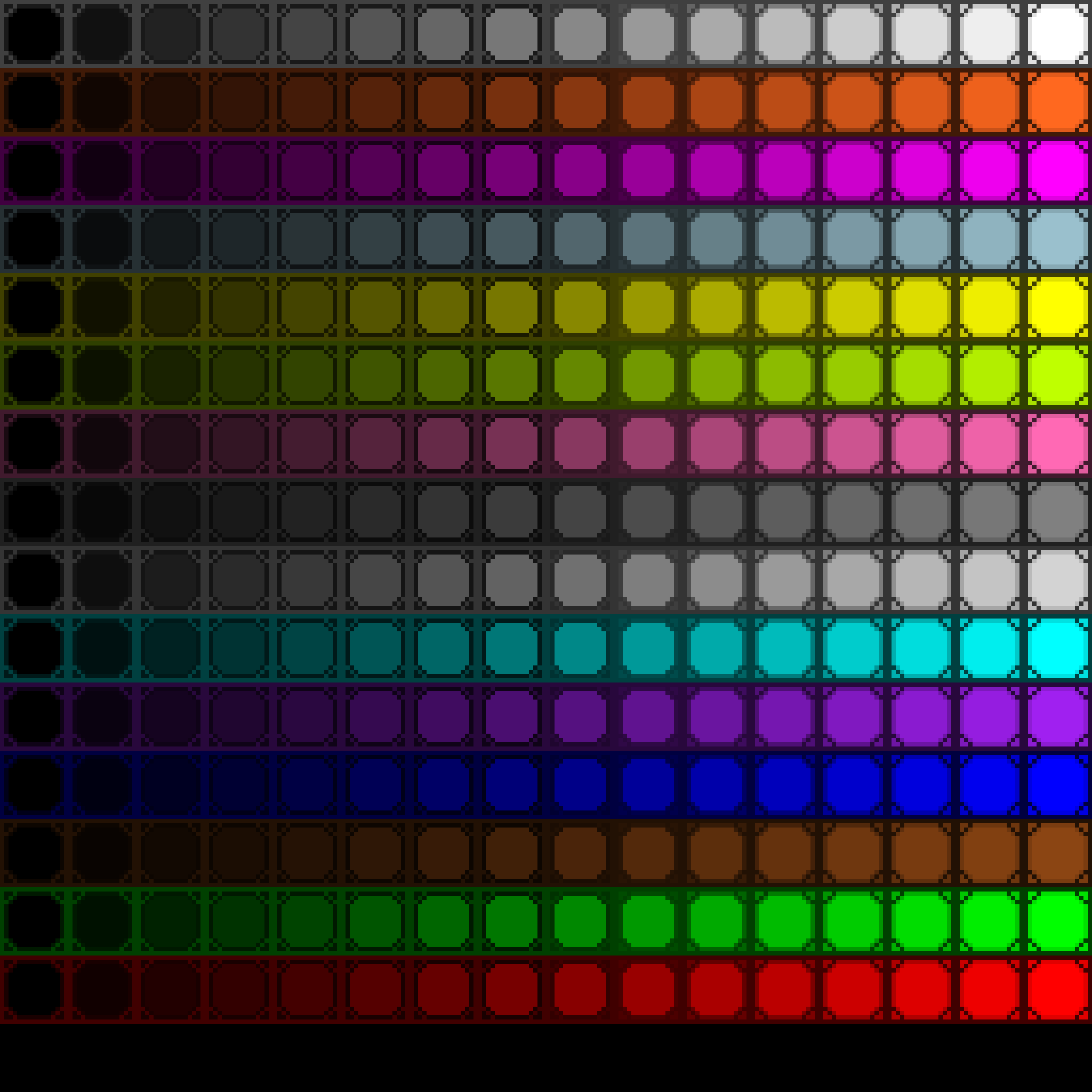
Configuration
By default, the Colored Lamp uses the color #F2BD74, which closely resembles the color of a standard Redstone Lamp.
Right-clicking the block with any Stained Glass Pane consumes the pane and applies its color to the lamp.
Right-clicking the block with Colored Lamp item copies the color and consumes a Stained Glass Pane if one is present. The Colored Lamp item can then be placed and the color will be applied.
If a Stained Glass Pane is in the off-hand slot, then using the Colored Lamp item consumes the pane and applies its color to the lamp. The Colored Lamp item can then be placed and the color will be applied.
- Applying a new pane replaces the previous one and drops the previously used pane.
- Breaking the Colored Lamp will also drop the currently applied pane.
The resulting color depends on the pane used:
| Stained Glass Pane | Color Code |
|---|---|
| White Stained Glass Pane | #FFFFFF |
| Orange Stained Glass Pane | #FF681F |
| Magenta Stained Glass Pane | #FF00FF |
| Light Blue Stained Glass Pane | #9AC0CD |
| Yellow Stained Glass Pane | #FFFF00 |
| Lime Stained Glass Pane | #BFFF00 |
| Pink Stained Glass Pane | #FF69B4 |
| Gray Stained Glass Pane | #808080 |
| Light Gray Stained Glass Pane | #D3D3D3 |
| Cyan Stained Glass Pane | #00FFFF |
| Purple Stained Glass Pane | #A020F0 |
| Blue Stained Glass Pane | #0000FF |
| Brown Stained Glass Pane | #8B4513 |
| Green Stained Glass Pane | #00FF00 |
| Red Stained Glass Pane | #FF0000 |
| Black Stained Glass Pane | #000000 |
Yes, applying a Black Stained Glass Pane will make the lamp appear pitch black, and it will still emit light normally.
Internally, the lamp color is stored as a 3-byte array in the block
entity (color). This value can be modified using commands to obtain
any RGB color, not just those available from stained glass panes.
Instead of Stained Glass Pane, any other item with tag:
- version 1.20.4 and older:
forge:stained_glass_panes - version 1.20.6 and newer:
c:glass_panesandc:dyed(both are required)
can be used.
Crafting
| Ingredients | Crafting Recipe |
| 1 Glass Pane | |
| 1 Redstone Lamp | |
| 1 Tinted Glass |
Data
Block State
Registry name: redstonecg:colored_lamp_indicator
Block properties:
power(0|1|2|3|4|5|6|7|8|9|10|11|12|13|14|15): sets brightness.
Block Entity
Structure:
-
id: block entity identifier -redstonecg:default_colored_lamp -
x: X coordinate of the block entity. -
y: Y coordinate of the block entity. -
z: Z coordinate of the block entity. -
color(length of 3): sets the color of this lamp. -
item(Optional): if present, stores identifier of an item that was used to stain this block.
Item
Structure (1.20.4 and older):
-
id: item identifier -redstonecg:colored_lamp_indicator -
Count: the amount of items in this stack. -
tag(Optional): additional data.-
BlockParameterSet(Optional): set of parameters for placing a block.-
item(Optional): identifier of an item that will be used to stain this block. Also used for Control Panel Panel to obtain color. -
power(Optional): Used for Control Panel Panel to store brightness. -
color(Optional): Used for Control Panel Panel to store encoded RGB888 color.
-
-
Structure (1.20.6 and newer):
-
id: item identifier -redstonecg:colored_lamp_indicator -
Count: the amount of items in this stack. -
components(Optional): item data components.-
minecraft:custom_data(Optional): custom data.-
BlockParameterSet(Optional): set of parameters for placing a block.-
item(Optional): identifier of an item that will be used to stain this block. Also used for Control Panel Panel to obtain color. -
power(Optional): Used for Control Panel Panel to store brightness. -
color(Optional): Used for Control Panel Panel to store encoded RGB888 color.
-
-
-
Version Log
| Version | Description |
| 0.3.0 | Introduced. |
| 0.3.2 | Item can copy the color from a block or a stained glass pane in off-hand. |
| 0.3.4 | Removed block entity renderer, so block renders just like a normal block. |