Overview
Arrow Indicator is a visual indicator that displays the strength of a redstone signal using a rotating arrow. The arrow changes its angle depending on the supplied signal level, allowing players to quickly observe signal changes in a circuit.
The block can read both Redstone signals and RedCu Wire signals.
A text can be written on the indicator with Formatting Notation by changing the item name with an Anvil. Text will be scaled to fit 75% of the surface.
Arrow Indicator Interface
After placement, right-clicking the block with an empty hand or with any item except Arrow Indicator or Rotation Bracket opens the configuration interface.
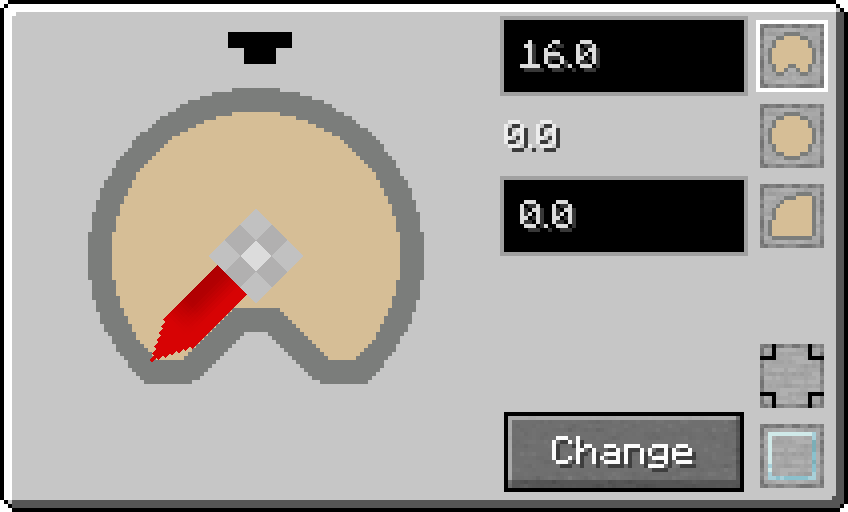
The interface allows the player to configure several aspects of the indicator:
- Pin configuration - The button group at bottom-right corner changes Pin Mark A configuration.
- Decorative glass cover - A toggle located in the bottom-right corner enables or disables a glass cover over the indicator.
-
Indicator background style - Three buttons in the top-right corner allow the
player to choose the visual style of the indicator background:
- 3/4 circle
- Full circle
- 1/4 circle
-
Signal range configuration - Two text boxes to the left of the style buttons
allow the player to define the signal range used for the indicator.
- The top box sets the maximum signal value.
- The bottom box sets the minimum signal value.
- The current signal level is displayed between them.
The input boxes accept floating-point values, including negative numbers. If the minimum value is greater than the maximum value, the arrow will rotate counterclockwise instead of clockwise.
Configuration Inherence
By default, the Arrow Indicator reads signals in the range from 0 to 16 and uses the 3/4 circle background style without a glass cover.
After configuring an Arrow Indicator block, the player can transfer its configuration to an Arrow Indicator item. This is done by right-clicking the configured block while holding an Arrow Indicator item.
When the configuration is copied:
- The item receives an enchantment glow effect.
- The item description displays the inherited configuration.
Placing the item as a block will apply the stored configuration to the newly placed Arrow Indicator.
To clear the stored configuration, simply right-click the item in the air.
Crafting
| Ingredients | RedCu Crafter Recipe |
| 1 Smooth Stone Plate | |
| 1 Redstone Dust | |
| 1 Flint |
Data
Block State
Registry name: redstonecg:arrow_indicator
Block properties:
waterlogged(false|true): determines whether the block is waterlogged.connection(0|1|2|3|4|5|6|7|8|9|10|11|12|13|14|15): sets Pin Mark configuration.
Block Entity
Structure:
-
id: block entity identifier -redstonecg:arrow_indicator -
x: X coordinate of the block entity. -
y: Y coordinate of the block entity. -
z: Z coordinate of the block entity. -
state: encoded facing and rotation used to orient the block. -
angle: angle of the arrow in radians. -
range: signal reading range in RedCu Wire signal units. The first integer specifies the minimum and the second specifies the maximum. Values can be negative, and the two values can be swapped. -
model: encoded indicator model (0-5), in the following order:3/4,full,1/4,3/4 + glass,full + glass,1/4 + glass. -
base_read: determines whether the block reads signal in the direction of its base . -
CustomName(Optional): custom name of the block and displayed text.
Item
Structure (1.20.4 and older):
-
id: item identifier -redstonecg:arrow_indicator -
Count: the amount of items in this stack. -
tag(Optional): additional item data.-
display(Optional)-
Name: Composed text used for item name and to be used as displayed text.
-
-
BlockParameterSet(Optional): set of parameters for placing a block.-
connection(Optional): target Pin Mark configuration of the block. -
model(Optional): target model of the block. Also used for Control Panel Panel. -
range(Optional): target signal range of the block. Also used for Control Panel Panel. -
power(Optional): used by Control Panel Panel to store the displayed power in RedCu Wire signal units.
-
-
Structure (1.20.6 and newer):
-
id: item identifier -redstonecg:arrow_indicator -
Count: the amount of items in this stack. -
components(Optional): item data components.-
minecraft:custom_name(Optional): Composed text used for item name and to be used as displayed text. -
minecraft:custom_data(Optional): custom data.-
BlockParameterSet(Optional): set of parameters for placing a block.-
connection(Optional): target Pin Mark configuration of the block. -
model(Optional): target model of the block. Also used for Control Panel Panel. -
range(Optional): target signal range of the block. Also used for Control Panel Panel. -
power(Optional): used by Control Panel Panel to store the displayed power in RedCu Wire signal units.
-
-
-
Version Log
| Version | Description |
| 0.3.0 | Introduced. |
| 0.3.3 | A text can be written on the block and replaced "Change" button with dedicated pin configuration buttons. |