Overview
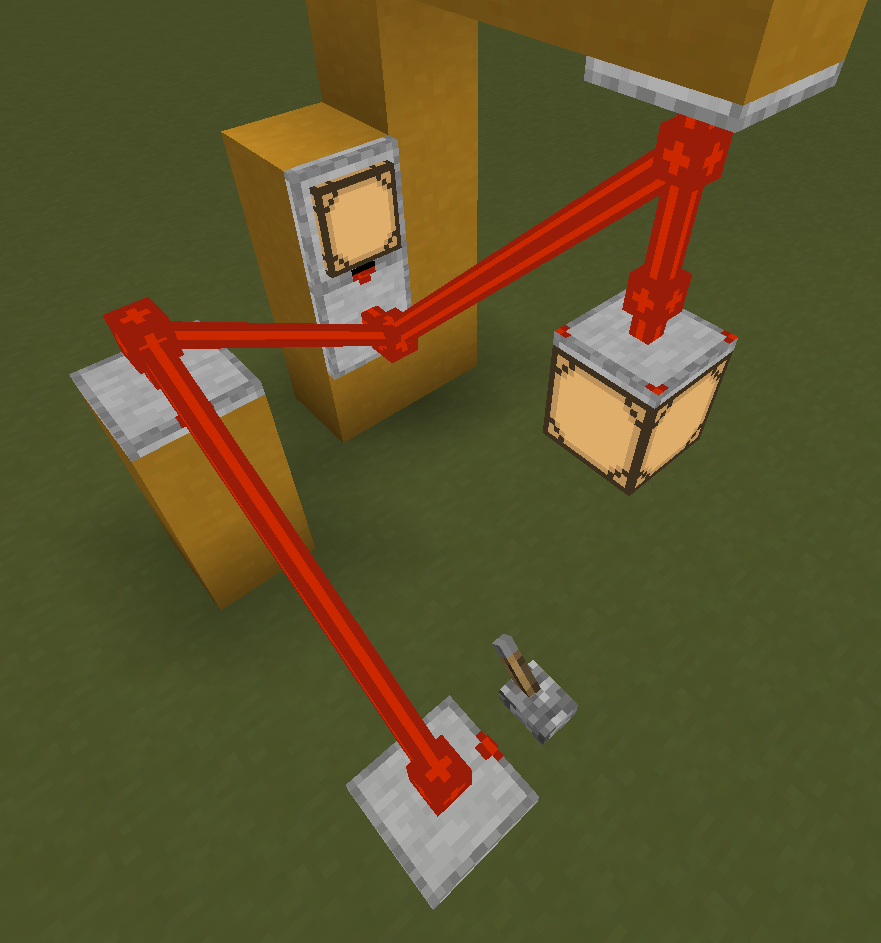
The Hanging RedCu Wire Connector is a special RedCu component designed to connect two distant redstone-compatible components using a suspended RedCu Wire. It allows signal transmission through air without requiring intermediate support blocks.
Unlike most RedstoneCG blocks such as gates, wires, and indicators, the Hanging RedCu Wire Connector can float in mid-air. It also provides a solid mounting surface at its base, enabling decorative or structural redstone builds where components must hang from ceilings or remain suspended.
Crafting
| Ingredients | RedCu Crafter Recipe |
| 1 Smooth Stone Plate | |
| 2 RedCu Wire |
Functionality
To connect two components using Hanging RedCu Wire Connectors:
- Place a Hanging RedCu Wire Connector block so it connects to a redstone-compatible component.
- Right-click the placed block using a Hanging RedCu Wire Connector item. The item will store the position of the clicked block.
When the position is stored:
- The item gains an enchantment glow effect.
- The item description displays the stored coordinates.
- The stored position can be cleared by right-clicking in air
After storing a position, place another Hanging RedCu Wire Connector block using the same item at the desired location.
- If the distance between the two blocks is less than or equal to 16 blocks, they will automatically connect with a Hanging RedCu Wire.
- The amount of RedCu Wire items consumed equals the calculated distance.
- If the player does not have enough RedCu Wire in inventory, the connection will not be established.
The maximum connection length can be modified using command:
/redstonecg_gameplay maxHangingRedCuWireLength <value>
The distance between the two connectors is calculated as the real spatial distance between them and then rounded down using a mathematical floor operation. So if the actual distance is 13.56, the used distance is 13.
Signal propagation through the Hanging RedCu Wire behaves identically to a standard RedCu Wire.
Connection
Unlike most gates, the Hanging RedCu Wire Connector uses a RedCu Pin Mark. This indicates that the block behaves as a RedCu Wire connection rather than a standard redstone block.
Right-clicking the block with any item or an empty hand except Hanging RedCu Wire Connector item will cycle through available pin configurations.
Every 16th click toggles the base connection state, shown by the RecCu Pinmarks in the corners . When enabled, the block can both read and output signal from its base.
Moving
Moving a Hanging RedCu Wire Connector is generally discouraged, as the block stores information about the connector it is attached to. However, Hanging RedCu Wire Connectors include a recovery mechanism that attempts to restore connections whenever possible.
Consider a setup where two connectors, A and B, are connected. Connector A is placed first and connector B is placed second.
Whenever either connector is updated, a connection check procedure is executed for each connection.

Each connector primarily stores the relative position of the connector it is attached to and also maintains a precomputed absolute position. During recovery, the connector first attempts to verify or restore the connection using the relative position. If that fails, it falls back to the stored absolute position. If the absolute position successfully locates a valid connector, the relative position is updated accordingly.
Based on this behavior, the following outcomes can be expected:
- If both A and B remain stationary, the connection remains fully functional.
- If B is moved and neither connector receives an update, a visual glitch may appear where one end of the Hanging RedCu Wire remains attached to A or B while the other end appears to float in space.
- If A is updated and no Hanging RedCu Wire Connector exists at B's expected position, A removes the connection.
- If A is updated and another Hanging RedCu Wire Connector exists at B's expected position, A assumes that connector is the intended target and connects to it.
- If B is updated and another Hanging RedCu Wire Connector exists at the predicted position of A, B connects to that connector.
-
If B is updated and connector A is within the configured
maxHangingRedCuWireLengthdistance, B can recreate the connection to A. This recovery path specifically requires B's Block Entity to have been moved rather than unloaded and reloaded, because only the relative position is preserved when the Block Entity is saved and loaded. - The same behavior applies if A is moved while B remains stationary.
- If both connectors are moved at the same time, the connection is preserved and can continue functioning normally.
Data
Block State
Registry name: redstonecg:hanging_redcu_wire_connector
Block properties:
waterlogged(false|true): determines whether the block is waterlogged.connection(0|1|2|3|4|5|6|7|8|9|10|11|12|13|14|15): sets Pin Mark configuration. On15, there are no Pin Marks on the sides. Each time this is set to15, block entity propertybase_readis toggled.
Block Entity
Structure:
-
id: block entity identifier -redstonecg:hanging_redcu_wire_connector -
x: X coordinate of the block entity. -
y: Y coordinate of the block entity. -
z: Z coordinate of the block entity. -
state: encoded facing and rotation used to orient the block. -
power: current RedCu Wire signal level (0-255). -
base_read: determines if block reads and sends signal in the direction of its base. -
targets(Optional): list of connected Hanging RedCu Wire Connectors.- Each target is stored as a compound containing:
-
render: determines whether this Hanging RedCu Wire Connector renders a Hanging RedCu Wire connecting to the target. -
relative(length of 3): relative position of the target Hanging RedCu Wire Connector from the position of this Hanging RedCu Wire Connector. -
position(Optional) (length of 3): absolute position of the target Hanging RedCu Wire Connector. This value is not saved, as it is precalculated internally usingrelative. It can be specified to override precalculation and is also used to obtainrelativeifrelativeis missing.
-
- Each target is stored as a compound containing:
Item
Structure (1.20.4 and older):
-
id: item identifier -redstonecg:hanging_redcu_wire_connector -
Count: the amount of items in this stack. -
tag(Optional): additional data.-
TargetConnector(Optional): data of the block that this block will connect to.-
position(length of 3): absolute position of the target block.
-
-
Structure (1.20.6 and newer):
-
id: item identifier -redstonecg:hanging_redcu_wire_connector -
Count: the amount of items in this stack. -
components(Optional): item data components.-
minecraft:custom_data(Optional): custom data.-
TargetConnector(Optional): data of the block that this block will connect to.-
position(length of 3): absolute position of the target block.
-
-
-
Version Log
| Version | Description |
| 0.3.0 | Introduced. |
| 0.3.3 | Changed connection check mehanism. |